余談だが、前述の rsync の公式サイトは https://rsync.samba.org/ で、Samba と同じ所にある。
筆者は、仮想マシン上の FreeBSD ←→ ホストの MS-Windows 間でファイルをやり取りするために、従来より Samba を用いている。
Samba は、既に xfce の依存関係でインストールされていたようだ。
% pkg info | egrep -i samba
samba416-4.16.11_10            Free SMB/CIFS and AD/DC server and client for Unix
以下のような /usr/local/etc/smb4.conf ファイルを作成した (旧環境から持って来て一部を変えた)。 ここではワークグループ名を「NSMRTKS」、NetBIOS 名を「fb」と設定している。
# 2019-10-08,2026-04-01 (Happy Birthday Kinomoto Sakura!) nsmrtks

[global]
        workgroup = NSMRTKS
        netbios name = fb
        map archive = no

[homes]
        comment = Home Directories (%h)
        browseable = no
        writable = yes

# end-of-file
また、/etc/rc.conf に以下を追記し、samba_server_enable を YES にする。 (samba_server_enable について /usr/local/etc/rc.d/samba_server を参照)
# 2026-04-01 (Happy Birthday Kinomoto Sakura!) nsmrtks
# (see /usr/local/etc/rc.d/samba_server)
samba_server_enable="YES"
Samba を起動する..前に、筆者は旧環境 (fb140) で動作している Samba が同じ名前 (「fb」) であり、衝突するし、新環境の Samba があれば不要なので、停止させ、また起動しないようにした。
そうしたら、新環境の Samba を起動する。
% service samba_server status
nmbd is not running.
smbd is not running.
1で終了しました

% sudo service samba_server start
パスワード: 〜
Performing sanity check on Samba configuration: OK
Starting nmbd.
Starting smbd.

% sudo service samba_server status
nmbd is running as pid 95685.
smbd is running as pid 95690.
Samba のプロセス (smbd と nmbd) が本当に起動しているかどうか、筆者はよく以下のようにして確かめる。
% ps axw | egrep mb
95685  -  Ss       0:00.15 /usr/local/sbin/nmbd --daemon --configfile=/usr/local/etc/smb4.conf
95690  -  Is       0:14.35 /usr/local/sbin/smbd --daemon --configfile=/usr/local/etc/smb4.conf
95747  -  S        0:00.00 /usr/local/sbin/smbd --daemon --configfile=/usr/local/etc/smb4.conf
95748  -  S        0:00.00 /usr/local/sbin/smbd --daemon --configfile=/usr/local/etc/smb4.conf
95763  5  S+       0:00.00 egrep mb
そして、ユーザ (自分) を Samba に追加する。 (コマンド名が類推しにくいが pdbedit である)
% sudo pdbedit -a -u nsmrtks
new password:【パスワードを考えて入力】
retype new password:【もういちど入力】
Unix username:        nsmrtks
NT username:
Account Flags:        [U          ]
User SID:             S-1-5-21-3288815189-2154259517-1244425743-1000
Primary Group SID:    S-1-5-21-3288815189-2154259517-1244425743-513
Full Name:            NISHIMURA Takeshi ~nsmrtks
Home Directory:       \\FB\nsmrtks
HomeDir Drive:
Logon Script:
Profile Path:         \\FB\nsmrtks\profile
Domain:               FB
Account desc:
Workstations:
Munged dial:
Logon time:           0
Logoff time:          木, 07  2月 2036 00:06:39 JST
Kickoff time:         木, 07  2月 2036 00:06:39 JST
Password last set:    水, 01  4月 2026 10:12:28 JST
Password can change:  水, 01  4月 2026 10:12:28 JST
Password must change: never
Last bad password   : 0
Bad password count  : 0
Logon hours         : FFFFFFFFFFFFFFFFFFFFFFFFFFFFFFFFFFFFFFFFFF
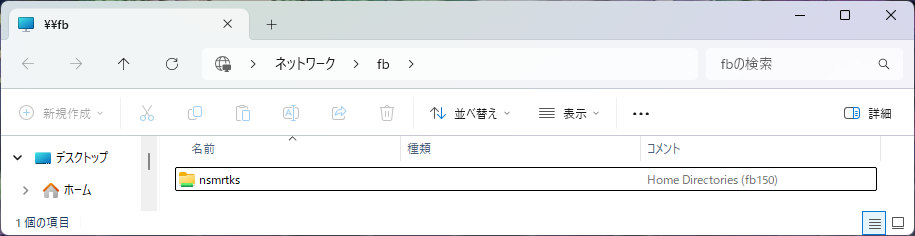
これで、MS-Windows 側から \\fb でアクセスできるようになった。
既に仮想マシンの作成編で設定済みだが、VirtualBox のメニューで『デバイス』→『クリップボードの共有』が「双方向」になっているはずである。
これで、VirtualBox 内の X11 と、ホストの MS-Windows
間で、コピー & ペーストが出来るようになっている。
素晴らしいことに、日本語を含んでいても、正常にコピー & ペースト出来る!
ちなみに urxvt (rxvt-unicode) については、マウスで範囲選択後 Ctrl-Alt-c でテキストのコピー、Shift-Insert でテキストのペーストが出来る。
もし、不意にコピー/ペーストが出来なくなってしまったという場合..
% ps auxw | egrep -i vbox
nsmrtks    32457   0.5  0.0   29584    4012  -  I    水08        8:06.18 /usr/local/bin/VBoxClient --draganddrop
root        1847   0.1  0.0   32612    2840  -  Is   火15        1:09.54 /usr/local/sbin/VBoxService
nsmrtks    17600   0.0  0.0   16780    3940  -  Is   21:04       0:00.00 VBoxClient --clipboard
nsmrtks    17602   0.0  0.1   39292   11888  -  I    21:04       0:01.61 VBoxClient --clipboard
nsmrtks    32451   0.0  0.0   16780    3280  -  Is   水08        0:00.00 /usr/local/bin/VBoxClient --seamless
nsmrtks    32454   0.0  0.0   29456    4120  -  I    水08        3:54.71 /usr/local/bin/VBoxClient --seamless
nsmrtks    32455   0.0  0.0   16780    3260  -  Is   水08        0:00.00 /usr/local/bin/VBoxClient --draganddrop
nsmrtks    32463   0.0  0.0   16780    3276  -  Is   水08        0:00.00 /usr/local/bin/VBoxClient --vmsvga-session
nsmrtks    32464   0.0  0.0   29640    4288  -  I    水08        0:58.39 /usr/local/bin/VBoxClient --vmsvga-session
nsmrtks     1545   0.0  0.0   14692    2596  5  S+   09:34       0:00.00 egrep -i vbox
ps x で VBoxClient --clipboard というものの PID を調べ、それを kill して (それでも停止しない場合 kill -KILL して)、同じように VBoxClient --clipboard で立ち上げ直すと、たいてい直る。
上の実行例は、実際そうなってしまった後のもので、手動で VBoxClient --clipboard を実行したため、ここだけ /usr/local/bin/ が付いていない。
デフォルトの FreeBSD の設定では、/etc/crontab にて、夜中〜早朝深夜に daily / weekly / monthly の自動メンテナンスが走るようになっている。 また weekly については土曜 (の早朝深夜) である。
# /etc/crontab - system crontab for FreeBSD
〜
#minute hour    mday    month   wday    who     command
〜
# Perform daily/weekly/monthly maintenance.
1       3       *       *       *       root    periodic daily
15      4       *       *       6       root    periodic weekly
30      5       1       *       *       root    periodic monthly
〜
筆者の環境はそのような時間に PC の電源が入っていないので、これを平日の日中に実行するように変更する。
% cd /etc

% sudo cp -ip crontab crontab.ORIG
パスワード: 〜

% sudoedit /etc/crontab
〜
一部を以下のようになるように編集した。
〜
#minute hour    mday    month   wday    who     command
〜
# Perform daily/weekly/monthly maintenance.
40      12      *       *       *       root    periodic daily
15      14      *       *       2       root    periodic weekly
30      15      1       *       *       root    periodic monthly
〜
なお、/etc/crontab ファイルの更新さえすれば (ファイルの更新時刻が新しくなっていれば)、cron デーモンの再起動等は特に不要である。 cron(8) (man cron) を参照。
Additionally, cron checks each minute to see if its spool directory's modification time (or the modification time on /etc/crontab) has changed, and if it has, cron will then examine the modification time on all crontabs and reload those which have changed. Thus cron need not be restarted whenever a crontab file is modified. 〜
これを設定すると、daily / weekly / monthly が実行された日は、root
宛にメールが来るようになる。
自分は sudo -i して mail コマンドで見ている。
筆者は、ホームディレクトリのバックアップと、freebsd-update fetch と、ports の更新等を一括して行うスクリプトを、日々走らせている (手動で起動)。
ただしここまで、新環境ではまだそのスクリプトを走らせていなかった。 走らせられるように、ここではそれを設定する。
以下がコマンドラインから (日々) 走らせる(実行する)スクリプトである。 ファイル名 (コマンド名) は bu としている (backup と update の略)。
#!/bin/sh
# 2026-04-03 nsmrtks
# 2025-07-17,18 nsmrtks
# 2024-06-15,29 nsmrtks
# 2022-08-08,09-25,10-03,05,11 nsmrtks
# 2019-10-18 nsmrtks
# 2014-12-01,29 nsmrtks
# 2014-03-14 for fb092 ..
# 2012-03-16, 09-03, 11-18, 2013-02-21, 06-04 nsmrtks

# (require back2 and updatefb)

# go to the directory
cd /var/tmp/log || exit 1

# some commands may not work with proxy..
unset http_proxy https_proxy all_proxy

# get the privilege for updatefb
sudo pwd

# compress the logs
find . -name \*.log -mtime +1 -print0 | xargs -0 xz -v -T0

# backup
back2

# updatefb
[ -d updatefb ] || ( set -x ; mkdir updatefb )
( cd updatefb && teetime updatefb )

# EoF
このスクリプト (bu) からはさらに、back2 と updatefb というスクリプトが呼び出されている。
bu 及び、back2 と updatefb は、いずれも ~/bin ディレクトリに配置してコマンドパスを通し、実行属性を付けてある。
back2 は、ホームディレクトリのバックアップを行うスクリプトである。 短いのでついでに紹介しておく。
#!/bin/sh
# 2024-04-08,2026-04-03 nsmrtks
# 2021-05-10 nsmrtks
# 2015-02-03,11-25,2016-05-29,2017-10-02,2019-10-18,2020-02-03 nsmrtks
# moved from bup

# (require teetime)

if [ `hostname`. != fb150.nsmrtks.jp. ]; then
        echo this is not fb150, backup not supported
        exit 1
fi

[ -d /var/tmp/log/back ] || ( set -x ; mkdir /var/tmp/log/back )
cd /var/tmp/log/back || exit 1

set -x
teetime -t rsync \
 rsync -a --delete-before /home/nsmrtks/ fb140c:/zfs/nsmrtks/

# EoF
updatefb は、freebsd-update fetch や pkg audit -F や ports ツリーの更新を行うスクリプトである。 以下のような内容にしている。
#!/bin/sh
# 2010-11-04,12,2013-03-14-     Time-stamp: <2026-04-03 11:53:50 nsmrtks>

date
echo ==========================================================================
( set -x ; sudo freebsd-update fetch )
echo ==========================================================================
( set -x ; sudo pkg update )
echo --------------------------------------------------------------------------
( set -x ; sudo pkg audit -F )
echo ==========================================================================
( set -x ; cd /usr/ports && make update fetchindex )
echo ==========================================================================
( set -x ; sudo portversion -c > portversion-c.sh )
echo ==========================================================================
date

# EoF
この最後の方で、portversion -c というコマンドを実行し
(portversion は portupgrade ツール群に含まれるコマンド)、リダイレクト出力で
/var/tmp/log/updatefb/portversion-c.sh というファイルを作成している。
これは中身が sh スクリプトになっており、sh
で実行すると、更新があるパッケージについて portupgrade
を実行してくれるというものになっている。
(更新があるパッケージ名が内部でずらずら列挙されている)
portversion-c.sh の実行については後述する。
これで準備が出来た。 おもむろに bu を実行する。
fb150% bu
パスワード: 〜
/var/tmp/log
〜
+ mkdir /var/tmp/log/back
+ teetime -t rsync rsync -a --delete-before /home/nsmrtks/ fb140c:/zfs/nsmrtks/
logging (from the next line till the end) to rsync20260403.log
teetime! 2026年 4月 3日 金曜日 12時14分30秒 JST
teetime! working directory is /var/tmp/log/back
teetime> rsync -a --delete-before /home/nsmrtks/ fb140c:/zfs/nsmrtks/
〜
teetime! 2026年 4月 3日 金曜日 12時23分30秒 JST
+ mkdir updatefb
logging (from the next line till the end) to updatefb20260403.log
teetime! 2026年 4月 3日 金曜日 12時23分30秒 JST
teetime! working directory is /var/tmp/log/updatefb
teetime> updatefb
2026年 4月 3日 金曜日 12時23分30秒 JST
==========================================================================
+ sudo freebsd-update fetch
パスワード: 〜
Looking up update.FreeBSD.org mirrors... 3 mirrors found.
Fetching metadata signature for 15.0-RELEASE from update1.freebsd.org... done.
Fetching metadata index... done.
Fetching 2 metadata patches.. done.
Applying metadata patches... done.
Inspecting system... done.
Preparing to download files... done.
Fetching 24 patches.....10....20.. done.
Applying patches... done.
The following files will be updated as part of updating to
15.0-RELEASE-p5:
/bin/freebsd-version
/boot/kernel/kernel
〜
==========================================================================
+ sudo pkg update
〜
--------------------------------------------------------------------------
+ sudo pkg audit -F
〜
==========================================================================
+ cd /usr/ports
+ make update fetchindex
〜
==========================================================================
+ sudo portversion -c
〜
==========================================================================
2026年 4月 3日 金曜日 12時27分26秒 JST
teetime! 2026年 4月 3日 金曜日 12時27分26秒 JST
少し話が飛んでややこしくなるが、上の実行例で示した通り、bu
の中で実行した freebsd-update fetch で、FreeBSD
のベースシステムに更新があることが表示されている。
そのため、(portversion-c.sh を走らせて portupgrade を実行する前に)
freebsd-update install を先に実行することにする。
% freebsd-version -ku
15.0-RELEASE-p2
15.0-RELEASE-p3

% sudo freebsd-update install
パスワード: 〜
Creating snapshot of existing boot environment... done.
Installing updates...
Restarting sshd after upgrade
Performing sanity check on sshd configuration.
Stopping sshd.
Waiting for PIDS: 2071.
Performing sanity check on sshd configuration.
Starting sshd.
 done.

% freebsd-version -ku
15.0-RELEASE-p5
15.0-RELEASE-p5
FreeBSD カーネルに関した更新も表示されていたので、シャットダウン、(仮想マシンの)電源を切り、再度(仮想マシンの)電源を入れた。
portversion-c.sh (portupgrade) の話に戻って、portversion-c.sh
を走らせるためのラッパースクリプトも用意してある。
以下のスクリプトを ~/bin/pug として配置し、実行属性も付けている。
#!/bin/sh
# 2024-06-29,2026-04-03 nsmrtks
# based on /var/tmp/log/pvc.sh

# Usage:
#       pug [portupgrade options..]
# Example:
#       pug
#       pug -w

# (require teetime and /var/tmp/log/updatefb/portversion-c.out)

pugdir=/var/tmp/log/pug
pvcout=/var/tmp/log/updatefb/portversion-c.sh

[ -d $pugdir ] || ( set -x ; mkdir $pugdir )

set -x
cd $pugdir && teetime -t pug sh $pvcout -s $*

# EoF
それでは pug を実行する。 しかし..
% nice +20 pug
+ mkdir /var/tmp/log/pug
+ cd /var/tmp/log/pug
+ teetime -t pug sh /var/tmp/log/updatefb/portversion-c.sh -s
logging (from the next line till the end) to pug20260407.log
teetime! 2026年 4月 7日 火曜日 10時16分36秒 JST
teetime! working directory is /var/tmp/log/pug
teetime> sh /var/tmp/log/updatefb/portversion-c.sh -s
[Reading data from pkg(8) ... - 885 packages found - done]
〜
途中で何度も No space left on device になってしまい、そのたびに停止させ、大きな容量を占めているディレクトリを調べて削除するという手段を取って容量を確保してから、pug -w で続行させた。 (pug スクリプトにオプションを付けると、それが portversion-c.sh スクリプトに渡される。)
容量の確保には、以下のような手段を取った。
そうしたら、pug に (適宜 -w を付けて) 再開。
何度もやり直しているうちに、python311 と openexr が vulnerable だと出て、それらに依存する (大量の) パッケージも含めて、それ以上進まなくなった。
〜
teetime! 2026年 4月15日 水曜日 16時50分55秒 JST
teetime! working directory is /var/tmp/log/pug
teetime> sh /var/tmp/log/updatefb/portversion-c.sh -s -w
[Reading data from pkg(8) ... - 887 packages found - done]
--->  [Executing a command as root: sudo /usr/bin/touch /var/db/pkgdb.fixme]
--->  Upgrading 'python311-3.11.14_2' to 'python311-3.11.15_1' (lang/python311)
--->  Building '/usr/ports/lang/python311'
===>  python311-3.11.15_1 has known vulnerabilities:
python311-3.11.15_1 is vulnerable:
〜
=> Please update your ports tree and try again.
〜
--->  Upgrading 'openexr-3.4.5' to 'openexr-3.4.8' (graphics/openexr)
--->  Building '/usr/ports/graphics/openexr'
===>  openexr-3.4.8 has known vulnerabilities:
openexr-3.4.8 is vulnerable:
〜
=> Please update your ports tree and try again.
〜
teetime! 2026年 4月15日 水曜日 17時11分11秒 JST
この時点で、上の方で bu を実行してから、既に 13日経過している。 ports ツリー等を更新するために、bu を再び実行する。
% bu
パスワード:
/var/tmp/log
〜
==========================================================================
+ sudo freebsd-update fetch
〜
No updates needed to update system to 15.0-RELEASE-p5.
==========================================================================
+ sudo pkg update
〜
--------------------------------------------------------------------------
+ sudo pkg audit -F
〜
==========================================================================
+ cd /usr/ports
+ make update fetchindex
〜
==========================================================================
+ sudo portversion -c
〜
llvm22 の work (work-default というディレクトリ) が残っていたので、それを (sudo) make clean した。
% ls -ld /usr/ports/*/*/work*
drwxr-xr-x  5 root wheel 23  4月 15 09:35 /usr/ports/devel/llvm22/work-default/

% du -hsx /usr/ports/*/*/work*
3.3G    /usr/ports/devel/llvm22/work-default

% cd /usr/ports/devel/llvm22

% sudo make clean
パスワード:
===>  Cleaning for llvm22-22.1.3

% ls -ld /usr/ports/*/*/work*
ls-F: 照合パターンに合いません.
1で終了しました
そうして、いまいちど pug を実行する。 が..
% nice +20 pug
+ cd /var/tmp/log/pug
+ teetime -t pug sh /var/tmp/log/updatefb/portversion-c.sh -s
logging (from the next line till the end) to pug20260416.log
teetime! 2026年 4月16日 木曜日 10時52分36秒 JST
teetime! working directory is /var/tmp/log/pug
teetime> sh /var/tmp/log/updatefb/portversion-c.sh -s
[Reading data from pkg(8) ... - 887 packages found - done]
〜
===>  python311-3.11.15_2 has known vulnerabilities:
python311-3.11.15_2 is vulnerable:
〜
=> Please update your ports tree and try again.
〜
teetime! 2026年 4月16日 木曜日 16時04分17秒 JST
いくつかのパッケージは更新されたが、python311 が相変わらず vulnerable だと出て、python311 とそれらに依存する (大量の) パッケージは、更新コンパイル出来なかった。
クソ真面目に考えると、セキュリティのためには、python311 と、それに依存するパッケージを全て、pkg delete した方が良いが..
しょうがないので、/etc/make.conf に以下を追記する。 (筆者が以前も書いたものがコメントアウトしてあった)
DISABLE_VULNERABILITIES=yes
そうして、いまいちど pug を再開する。 以下に示す通り、最初は /usr/ports/*/*/work* にマッチするディレクトリが無い状態になっていたので、pug に -w を付ける必要がなかった。
% ls -ld /usr/ports/*/*/work*
ls-F: 照合パターンに合いません.
1で終了しました

% nice +20 pug
+ cd /var/tmp/log/pug
+ teetime -t pug sh /var/tmp/log/updatefb/portversion-c.sh -s
conflicting pug20260416.log
logging (from the next line till the end) to pug2026041617.log
teetime! 2026年 4月16日 木曜日 17時23分30秒 JST
teetime! working directory is /var/tmp/log/pug
teetime> sh /var/tmp/log/updatefb/portversion-c.sh -s
[Reading data from pkg(8) ... - 887 packages found - done]
〜
ちょっと引っかかったので今度は pug -w で再開。
% nice +20 pug -w
+ cd /var/tmp/log/pug
+ teetime -t pug sh /var/tmp/log/updatefb/portversion-c.sh -s -w
logging (from the next line till the end) to pug20260420.log
teetime! 2026年 4月20日 月曜日 16時57分05秒 JST
teetime! working directory is /var/tmp/log/pug
teetime> sh /var/tmp/log/updatefb/portversion-c.sh -s -w
[Reading data from pkg(8) ... - 890 packages found - done]
〜
また何度かやり直したが、今度は py311-numpy1 が py311-numpy と conflict すると出て、それ以上進まなくなった。
〜
===>  Installing for py311-numpy1-1.26.4_3

===>  py311-numpy1-1.26.4_3 conflicts with installed package(s):
      py311-numpy-2.4.4_1,1

      They install files into the same place.
      You may want to stop build with Ctrl + C.
===>  Checking if py311-numpy1 is already installed
===>   Registering installation for py311-numpy1-1.26.4_3 as automatic
Installing py311-numpy1-1.26.4_3...
pkg-static: py311-numpy1-1.26.4_3 conflicts with py311-numpy-2.4.4_1,1 (installs files into the same place).  Problematic file: /usr/local/share/doc/py311-numpy/_images/np_matrix_indexing.png
*** Error code 1
〜
        ! math/Imath (Imath-3.2.2_2)    (dependent ports)
        * graphics/openexr (openexr-3.4.5)
        * graphics/vigra (vigra-1.12.3)
        * graphics/ImageMagick7 (ImageMagick7-7.1.2.15)
teetime! 2026年 4月21日 火曜日 12時48分40秒 JST
少々強引だが、py311-numpy を pkg delete して、依存関係で削除されたパッケージは後から portinstall し直すことにする。 (強引だな..)
% sudo pkg delete py311-numpy
パスワード:
Updating database digests format: 100%
Checking integrity... done (0 conflicting)
Deinstallation has been requested for the following 12 packages (of 0 packages in the universe):

Installed packages to be REMOVED:
        ImageMagick7: 7.1.2.15
        Imath: 3.2.2_2
        ffmpeg: 8.1,1
        firefox: 149.0.2,2
        libheif: 1.21.2_2
        libjxl: 0.11.2
        libreoffice: 26.2.2.2_2
        mplayer: 1.5.0.20260404
        openexr: 3.4.5
        py311-numpy: 2.4.4_1,1
        qt6-multimedia: 6.10.2
        vigra: 1.12.3

Number of packages to be removed: 12

The operation will free 1 GiB.

Proceed with deinstalling packages? [y/N]: y
〜
pug を最後まで進める.. portupgrade しようとしていたパッケージが全て pkg delete されてしまっていた。
% nice +20 pug -w
+ cd /var/tmp/log/pug
+ teetime -t pug sh /var/tmp/log/updatefb/portversion-c.sh -s -w
conflicting pug20260421.log
logging (from the next line till the end) to pug2026042113.log
teetime! 2026年 4月21日 火曜日 13時03分14秒 JST
teetime! working directory is /var/tmp/log/pug
teetime> sh /var/tmp/log/updatefb/portversion-c.sh -s -w
[Reading data from pkg(8) ... - 878 packages found - done]
teetime! 2026年 4月21日 火曜日 13時03分31秒 JST
この時点で、上の方で実行した 2回目の bu からも既に 5日経過しているので、portinstall し直す前に、みたび bu を実行する..
% bu
/var/tmp/log
〜
==========================================================================
+ sudo freebsd-update fetch
〜
No updates needed to update system to 15.0-RELEASE-p5.
==========================================================================
+ sudo pkg update
〜
--------------------------------------------------------------------------
+ sudo pkg audit -f
〜
==========================================================================
+ cd /usr/ports
+ make update fetchindex
〜
==========================================================================
+ sudo portversion -c
〜
/usr/ports/*/*/work* を削除し (portsclean -C では消えないようだ)..
% ls -ld /usr/ports/*/*/work*
drwxr-xr-x  5 root wheel 19  4月 20 10:07 /usr/ports/math/py-numpy1/work-py311/

% sudo portsclean -C
Cleaning out /usr/ports/*/*/work...
done.

% ls -ld /usr/ports/*/*/work*
drwxr-xr-x  5 root wheel 19  4月 20 10:07 /usr/ports/math/py-numpy1/work-py311/

% sudo rm -fr /usr/ports/*/*/work*

% ls -ld /usr/ports/*/*/work*
ls-F: 照合パターンに合いません.
1で終了しました
また pug を実行する..
% nice +20 pug
+ cd /var/tmp/log/pug
+ teetime -t pug sh /var/tmp/log/updatefb/portversion-c.sh -s
conflicting pug20260421.log
conflicting pug2026042113.log
logging (from the next line till the end) to pug202604211333.log
teetime! 2026年 4月21日 火曜日 13時33分51秒 JST
teetime! working directory is /var/tmp/log/pug
teetime> sh /var/tmp/log/updatefb/portversion-c.sh -s
[Reading data from pkg(8) ... - 878 packages found - done]
〜
** Listing the failed packages (-:ignored / *:skipped / !:failed)
        ! devel/py-build (py311-build-1.4.0)    (unknown build error)
        ! devel/py-hatchling (py311-hatchling-1.28.0)   (unknown build error)
        ! devel/py-mypy (py311-mypy-1.19.1)     (unknown build error)
        ! devel/py-black (py311-black-26.1.0)   (unknown build error)
        ! textproc/py-charset-normalizer (py311-charset-normalizer-3.4.4)       (unknown build error)
        ! www/py-httpx (py311-httpx-0.28.1_1)   (unknown build error)
        ! devel/py-isort (py311-isort-7.0.0)    (unknown build error)
        * www/py-requests (py311-requests-2.32.5)
        ! devel/py-maturin (py311-maturin-1.12.6_1)     (unknown build error)
        ! devel/py-ruff (py311-ruff-0.15.10)    (unknown build error)
teetime! 2026年 4月21日 火曜日 15時59分38秒 JST
今度は、なんかコンパイルできないものがたくさん出てしまったが..
それは今は置いておいて、先ほど削除されてしまったパッケージを portinstall し直す。
% ls -ld /usr/ports/*/*/work*
drwxr-xr-x  4 nsmrtks wheel 14  4月 21 15:25 /usr/ports/devel/py-black/work-py311/
drwxr-xr-x  4 nsmrtks wheel 14  4月 21 15:28 /usr/ports/devel/py-isort/work-py311/
drwxr-xr-x  8 nsmrtks wheel 19  4月 21 15:49 /usr/ports/devel/py-ruff/work-py311/
drwxr-xr-x  4 nsmrtks wheel 14  4月 21 15:27 /usr/ports/textproc/py-charset-normalizer/work-py311/
drwxr-xr-x  4 nsmrtks wheel 14  4月 21 15:28 /usr/ports/www/py-httpx/work-py311/

% rm -fr /usr/ports/*/*/work*

% ls -ld /usr/ports/*/*/work*
ls-F: 照合パターンに合いません.
1で終了しました

% nice +20 teetime -t ImageMagick7_ portinstall -s ImageMagick7
logging (from the next line till the end) to ImageMagick7_20260421.log
teetime! 2026年 4月21日 火曜日 16時08分55秒 JST
teetime! working directory is /var/tmp/log/Install
teetime> portinstall -s ImageMagick7
[Reading data from pkg(8) ... - 880 packages found - done]
〜
teetime! 2026年 4月21日 火曜日 17時13分24秒 JST
% ls -ld /usr/ports/*/*/work*
drwxr-xr-x  5 root wheel 20  4月 21 17:04 /usr/ports/graphics/libheif/work/
drwxr-xr-x  5 root wheel 23  4月 21 16:53 /usr/ports/graphics/libjxl/work/
drwxr-xr-x  5 root wheel 21  4月 21 16:44 /usr/ports/graphics/openexr/work/
drwxr-xr-x  5 root wheel 21  4月 21 16:39 /usr/ports/math/Imath/work/
drwxr-xr-x  4 root wheel 23  4月 21 16:26 /usr/ports/math/py-numpy1/work-py311/
drwxr-xr-x  5 root wheel 22  4月 21 17:02 /usr/ports/multimedia/ffmpeg/work-default/

% sudo rm -fr /usr/ports/*/*/work*
パスワード: 〜

% ls -ld /usr/ports/*/*/work*
ls-F: 照合パターンに合いません.
1で終了しました

% nice +20 teetime -t firefox portinstall -s firefox
logging (from the next line till the end) to firefox20260422.log
teetime! 2026年 4月22日 水曜日 08時51分26秒 JST
teetime! working directory is /var/tmp/log/Install
teetime> portinstall -s firefox
[Reading data from pkg(8) ... - 887 packages found - done]
〜
teetime! 2026年 4月22日 水曜日 12時59分43秒 JST
% ls -ld /usr/ports/*/*/work*
ls-F: 照合パターンに合いません.
1で終了しました

% nice +20 teetime -t libreoffice portinstall -s libreoffice
logging (from the next line till the end) to libreoffice20260422.log
teetime! 2026年 4月22日 水曜日 13時27分35秒 JST
teetime! working directory is /var/tmp/log/Install
teetime> portinstall -s libreoffice
[Reading data from pkg(8) ... - 888 packages found - done]
〜
teetime! 2026年 4月22日 水曜日 17時23分44秒 JST
% ls -ld /usr/ports/*/*/work*
ls-F: 照合パターンに合いません.
1で終了しました

% pwd
/var/tmp/log/Install

% nice +20 teetime -t mplayer portinstall -s mplayer
logging (from the next line till the end) to mplayer20260423.log
teetime! 2026年 4月23日 木曜日 08時50分50秒 JST
teetime! working directory is /var/tmp/log/Install
teetime> portinstall -s mplayer
[Reading data from pkg(8) ... - 891 packages found - done]
〜
teetime! 2026年 4月23日 木曜日 09時05分53秒 JST
この時点で、上の方で実行した 3回目の bu から 2日経過した。
前回 (3回目) の pug (portupgrade) で、コンパイルに失敗したパッケージがあるので、bu を実行して ports ツリーを更新してみる。
% bu
パスワード: 〜
/var/tmp/log
〜
teetime> updatefb
2026年 4月23日 木曜日 09時15分00秒 JST
==========================================================================
+ sudo freebsd-update fetch
Looking up update.FreeBSD.org mirrors... 3 mirrors found.
Fetching metadata signature for 15.0-RELEASE from update1.freebsd.org... done.
Fetching metadata index... done.
Fetching 2 metadata patches.. done.
Applying metadata patches... done.
Inspecting system... done.
Preparing to download files... done.
Fetching 45 patches.....10....20....30....40.. done.
Applying patches... done.
Fetching 1 files...  done.
The following files will be added as part of updating to
15.0-RELEASE-p6:
/usr/src/tests/sys/kern/tty/tiocnotty.c
The following files will be updated as part of updating to
15.0-RELEASE-p6:
/bin/freebsd-version
/boot/kernel/aout.ko
/boot/kernel/fasttrap.ko
/boot/kernel/hwpmc.ko
/boot/kernel/kernel
〜
==========================================================================
+ sudo pkg update
〜
--------------------------------------------------------------------------
+ sudo pkg audit -f
〜
==========================================================================
+ cd /usr/ports
+ make update fetchindex
〜
==========================================================================
+ sudo portversion -c
〜
ports ツリーの更新だけでなく、freebsd-update fetch で、またしても今回
FreeBSD のベースシステムにも更新があった。
そのため、(またも) freebsd-update install を実行することにする。
% freebsd-version -ku
15.0-RELEASE-p5
15.0-RELEASE-p5

% sudo freebsd-update install
Creating snapshot of existing boot environment... done.
Installing updates...
Restarting sshd after upgrade
Performing sanity check on sshd configuration.
Stopping sshd.
Waiting for PIDS: 2205.
Performing sanity check on sshd configuration.
Starting sshd.
 done.

% freebsd-version -ku
15.0-RELEASE-p6
15.0-RELEASE-p6
FreeBSD カーネルに関した更新も表示されていたので、シャットダウン、(仮想マシンの)電源を切り、再度(仮想マシンの)電源を入れた。
ports の話に戻って、pug をまた実行する。
% nice +20 pug
+ cd /var/tmp/log/pug
+ teetime -t pug sh /var/tmp/log/updatefb/portversion-c.sh -s
logging (from the next line till the end) to pug20260423.log
teetime! 2026年 4月23日 木曜日 09時40分58秒 JST
teetime! working directory is /var/tmp/log/pug
teetime> sh /var/tmp/log/updatefb/portversion-c.sh -s
[Reading data from pkg(8) ... - 892 packages found - done]
〜
** Listing the failed packages (-:ignored / *:skipped / !:failed)
        ! devel/ruby-gems (ruby33-gems-4.0.9)   (dependent ports)
        ! devel/py-build (py311-build-1.4.0)    (unknown build error)
        ! devel/py-hatchling (py311-hatchling-1.28.0)   (unknown build error)
        ! devel/py-black (py311-black-26.1.0)   (unknown build error)
        ! devel/py-wheel (py311-wheel-0.46.3_1) (unknown build error)
        ! textproc/py-charset-normalizer (py311-charset-normalizer-3.4.4)       (unknown build error)
        ! www/py-httpx (py311-httpx-0.28.1_1)   (unknown build error)
        ! devel/py-isort (py311-isort-7.0.0)    (unknown build error)
        ! devel/py-maturin (py311-maturin-1.12.6_1)     (unknown build error)
        ! devel/py-ruff (py311-ruff-0.15.10)    (unknown build error)
        * www/py-requests (py311-requests-2.32.5)
        ! devel/py-mypy (py311-mypy-1.19.1)     (unknown build error)
teetime! 2026年 4月23日 木曜日 13時32分42秒 JST

% nice +20 pug -w
+ cd /var/tmp/log/pug
+ teetime -t pug sh /var/tmp/log/updatefb/portversion-c.sh -s -w
conflicting pug20260423.log
logging (from the next line till the end) to pug2026042313.log
teetime! 2026年 4月23日 木曜日 13時35分07秒 JST
teetime! working directory is /var/tmp/log/pug
teetime> sh /var/tmp/log/updatefb/portversion-c.sh -s -w
[Reading data from pkg(8) ... - 892 packages found - done]
〜
===>  Installing for ruby-3.4.9,1
===>  Checking if ruby is already installed
===>   An older version of ruby is already installed (ruby-3.3.11,1)
      You may wish to ``make deinstall'' and install this port again
      by ``make reinstall'' to upgrade it properly.
      If you really wish to overwrite the old port of ruby
      without deleting it first, set the variable "FORCE_PKG_REGISTER"
      in your environment or the "make install" command line.
*** Error code 1
〜
        ! devel/py-build (py311-build-1.4.0)    (unknown build error)
        ! devel/py-hatchling (py311-hatchling-1.28.0)   (unknown build error)
        ! devel/py-isort (py311-isort-7.0.0)    (unknown build error)
        ! www/py-httpx (py311-httpx-0.28.1_1)   (unknown build error)
        ! devel/py-black (py311-black-26.1.0)   (unknown build error)
        ! devel/py-wheel (py311-wheel-0.46.3_1) (unknown build error)
        ! devel/ruby-gems (ruby33-gems-4.0.9)   (dependent ports)
        ! devel/py-mypy (py311-mypy-1.19.1)     (unknown build error)
        ! devel/py-maturin (py311-maturin-1.12.6_1)     (unknown build error)
        ! devel/py-ruff (py311-ruff-0.15.10)    (unknown build error)
        ! textproc/py-charset-normalizer (py311-charset-normalizer-3.4.4)       (unknown build error)
        * www/py-requests (py311-requests-2.32.5)
teetime! 2026年 4月23日 木曜日 13時41分41秒 JST
大量の Python 系が相変わらずインストールできないのは不明だが、それ以外には、ruby のインストールが An older version of ruby is already installed と出て失敗している。
そこで、またも強引だが、いったん ruby を、依存パッケージも含めて pkg delete する。
% sudo pkg delete ruby
パスワード:
Updating database digests format: 100%
Checking integrity... done (0 conflicting)
Deinstallation has been requested for the following 11 packages (of 0 packages in the universe):

Installed packages to be REMOVED:
        portupgrade: 2.4.16_4,2
        ruby: 3.3.11,1
        ruby33-bdb: 0.6.6_9
        ruby33-gems: 4.0.9
        rubygem-asciidoctor: 2.0.26
        rubygem-date: 3.5.1
        rubygem-erb: 6.0.2
        rubygem-psych: 5.3.1
        rubygem-rdoc: 6.17.0
        rubygem-stringio: 3.2.0
        rubygem-tsort: 0.2.0

Number of packages to be removed: 11

The operation will free 54 MiB.

Proceed with deinstalling packages? [y/N]: y
〜
portupgrade (ruby に依存) が消えてしまったので、インストールし直す。
portinstall (portupgrade に含まれるツール)
が使えないので、「portupgrade をインストールする」と同様、普通に make install でインストールする。
% cd /usr/ports/ports-mgmt/portupgrade

% nice +20 teetime -t install make install
logging (from the next line till the end) to install20260423.log
teetime! 2026年 4月23日 木曜日 13時55分59秒 JST
teetime! working directory is /usr/ports/ports-mgmt/portupgrade
teetime> make install
===>  License BSD3CLAUSE accepted by the user
===>   portupgrade-2.4.16_4,2 depends on file: /usr/local/sbin/pkg - found
===> Fetching all distfiles required by portupgrade-2.4.16_4,2 for building
===>  Extracting for portupgrade-2.4.16_4,2
=> SHA256 Checksum OK for portupgrade/freebsd-portupgrade-2.4.16_GH0.tar.gz.
===>   portupgrade-2.4.16_4,2 depends on file: /usr/local/bin/ruby34 - not found
===>  Installing for ruby-3.4.9,1
===>  Checking if ruby is already installed
mkdir: /usr/ports/lang/ruby34/work/.metadir.ruby: Permission denied
*** Error code 1

Stop.
make[3]: stopped making "/usr/ports/lang/ruby34/work/.install_done.ruby._usr_local" in /usr/ports/lang/ruby34
*** Error code 1

Stop.
make[2]: stopped making "install" in /usr/ports/lang/ruby34
*** Error code 1

Stop.
make[1]: stopped making "/usr/ports/ports-mgmt/portupgrade/work/.install_done.portupgrade._usr_local" in /usr/ports/ports-mgmt/portupgrade
*** Error code 1

Stop.
make: stopped making "install" in /usr/ports/ports-mgmt/portupgrade
teetime! 2026年 4月23日 木曜日 13時55分59秒 JST
おや。 make install に sudo を付けてやり直す。
% nice +20 teetime -t install sudo make install
conflicting install20260423.log
logging (from the next line till the end) to install2026042313.log
teetime! 2026年 4月23日 木曜日 13時57分06秒 JST
teetime! working directory is /usr/ports/ports-mgmt/portupgrade
teetime> sudo make install
パスワード:  〜
〜
Installing portupgrade-2.4.16_4,2...
teetime! 2026年 4月23日 木曜日 14時01分54秒 JST
なんとか portupgrade をインストールできたようだ。
この時点で、上の方で実行した 4回目の bu の翌日である。
大量の Python 系が相変わらずインストールできていないし、bu を実行して ports ツリーを更新してみる。
% bu
パスワード:
/var/tmp/log
〜
pug を実行する。 (portupgraqde が使っている Ruby 3.4 で変な警告が出るようになってしまった..)
% ls -ld /usr/ports/*/*/work*
〜

% sudo portsclean -C
/usr/local/lib/ruby/site_ruby/3.4/amd64-freebsd15/bdb.so: warning: redefining 'object_id' may cause serious problems
Cleaning out /usr/ports/*/*/work...
〜
done.

% ls -ld /usr/ports/*/*/work*
〜

% rm -fr /usr/ports/*/*/work*

% ls -ld /usr/ports/*/*/work*
ls-F: 照合パターンに合いません.
1で終了しました

% nice +20 pug
+ cd /var/tmp/log/pug
+ teetime -t pug sh /var/tmp/log/updatefb/portversion-c.sh -s
logging (from the next line till the end) to pug20260424.log
teetime! 2026年 4月24日 金曜日 13時18分45秒 JST
teetime! working directory is /var/tmp/log/pug
teetime> sh /var/tmp/log/updatefb/portversion-c.sh -s
/usr/local/lib/ruby/site_ruby/3.4/amd64-freebsd15/bdb.so: warning: redefining 'object_id' may cause serious problems
[Reading data from pkg(8) ... - 891 packages found - done]
〜
** Listing the failed packages (-:ignored / *:skipped / !:failed)
        ! devel/py-build (py311-build-1.4.0)    (unknown build error)
        ! devel/py-wheel (py311-wheel-0.46.3_1) (unknown build error)
        ! devel/py-maturin (py311-maturin-1.12.6_1)     (unknown build error)
        ! devel/py-ruff (py311-ruff-0.15.10)    (unknown build error)
        ! devel/py-lxml (py311-lxml-6.0.4)      (fetch error)
        * devel/py-mypy (py311-mypy-1.19.1)
        ! textproc/py-charset-normalizer (py311-charset-normalizer-3.4.4)       (unknown build error)
        * www/py-requests (py311-requests-2.32.5)
        ! devel/py-hatchling (py311-hatchling-1.28.0)   (unknown build error)
        ! devel/py-isort (py311-isort-7.0.0)    (unknown build error)
        ! www/py-httpx (py311-httpx-0.28.1_1)   (unknown build error)
        ! devel/py-black (py311-black-26.1.0)   (unknown build error)
teetime! 2026年 4月24日 金曜日 14時01分09秒 JST
まだ大量の Python 系が相変わらずインストールできていない。
これはどうやら、つい最近になって、py-wheel というパッケージに変更が入った影響を受けているらしい。
% pkg info | egrep wheel
py311-installer-1.0.0          Library for installing Python wheels
py311-wheel-0.46.3_1           Built-package format for Python
py311-wheel044-0.44.0_1        Built-package format for Python
よく分からないので、py311-wheel* に関係しそうなパッケージを pkg delete してみる。
% sudo pkg delete py311-wheel
Checking integrity... done (0 conflicting)
Deinstallation has been requested for the following 1 packages (of 0 packages in the universe):

Installed packages to be REMOVED:
        py311-wheel: 0.46.3_1

Number of packages to be removed: 1

Proceed with deinstalling packages? [y/N]: y
[1/1] Deinstalling py311-wheel-0.46.3_1...
[1/1] Deleting files for py311-wheel-0.46.3_1: 100%

% sudo pkg delete py311-wheel044
Checking integrity... done (0 conflicting)
Deinstallation has been requested for the following 1 packages (of 0 packages in the universe):

Installed packages to be REMOVED:
        py311-wheel044: 0.44.0_1

Number of packages to be removed: 1

Proceed with deinstalling packages? [y/N]: y
[1/1] Deinstalling py311-wheel044-0.44.0_1...
[1/1] Deleting files for py311-wheel044-0.44.0_1: 100%

% sudo pkg delete py311-installer
Checking integrity... done (0 conflicting)
Deinstallation has been requested for the following 1 packages (of 0 packages in the universe):

Installed packages to be REMOVED:
        py311-installer: 1.0.0

Number of packages to be removed: 1

The operation will free 1 MiB.

Proceed with deinstalling packages? [y/N]: y
[1/1] Deinstalling py311-installer-1.0.0...
[1/1] Deleting files for py311-installer-1.0.0: 100%
pug を再び実行。
% nice +20 pug
+ cd /var/tmp/log/pug
+ teetime -t pug sh /var/tmp/log/updatefb/portversion-c.sh -s
conflicting pug20260424.log
logging (from the next line till the end) to pug2026042414.log
teetime! 2026年 4月24日 金曜日 14時24分25秒 JST
teetime! working directory is /var/tmp/log/pug
teetime> sh /var/tmp/log/updatefb/portversion-c.sh -s
/usr/local/lib/ruby/site_ruby/3.4/amd64-freebsd15/bdb.so: warning: redefining 'object_id' may cause serious problems
[Reading data from pkg(8) ... - 888 packages found - done]
〜

% nice +20 pug -w
+ cd /var/tmp/log/pug
+ teetime -t pug sh /var/tmp/log/updatefb/portversion-c.sh -s -w
conflicting pug20260424.log
conflicting pug2026042414.log
logging (from the next line till the end) to pug202604241449.log
teetime! 2026年 4月24日 金曜日 14時49分17秒 JST
teetime! working directory is /var/tmp/log/pug
teetime> sh /var/tmp/log/updatefb/portversion-c.sh -s -w
/usr/local/lib/ruby/site_ruby/3.4/amd64-freebsd15/bdb.so: warning: redefining 'object_id' may cause serious problems
[Reading data from pkg(8) ... - 890 packages found - done]
〜
** Listing the failed packages (-:ignored / *:skipped / !:failed)
        ! devel/py-build (py311-build-1.4.0)    (unknown build error)
        ! textproc/py-charset-normalizer (py311-charset-normalizer-3.4.4)       (unknown build error)
        * www/py-requests (py311-requests-2.32.5)
        ! devel/py-hatchling (py311-hatchling-1.28.0)   (unknown build error)
        ! devel/py-isort (py311-isort-7.0.0)    (unknown build error)
        ! devel/py-mypy (py311-mypy-1.19.1)     (unknown build error)
        ! devel/py-maturin (py311-maturin-1.12.6_1)     (unknown build error)
        ! devel/py-ruff (py311-ruff-0.15.10)    (unknown build error)
        ! www/py-httpx (py311-httpx-0.28.1_1)   (unknown build error)
        ! devel/py-black (py311-black-26.1.0)   (unknown build error)
teetime! 2026年 4月24日 金曜日 15時19分52秒 JST

% pkg info | egrep wheel
py311-installer-1.0.0          Library for installing Python wheels
py311-wheel-0.47.0             Built-package format for Python
少し進んだようだがまだダメだ。
py-build も pkg delete して、やり直してみる。
% sudo pkg delete py311-build
Updating database digests format: 100%
Checking integrity... done (0 conflicting)
Deinstallation has been requested for the following 1 packages (of 0 packages in the universe):

Installed packages to be REMOVED:
        py311-build: 1.4.0

Number of packages to be removed: 1

Proceed with deinstalling packages? [y/N]: y
[1/1] Deinstalling py311-build-1.4.0...
[1/1] Deleting files for py311-build-1.4.0: 100%

% nice +20 pug -w
+ cd /var/tmp/log/pug
+ teetime -t pug sh /var/tmp/log/updatefb/portversion-c.sh -s -w
conflicting pug20260424.log
logging (from the next line till the end) to pug2026042415.log
teetime! 2026年 4月24日 金曜日 15時24分29秒 JST
teetime! working directory is /var/tmp/log/pug
teetime> sh /var/tmp/log/updatefb/portversion-c.sh -s -w
/usr/local/lib/ruby/site_ruby/3.4/amd64-freebsd15/bdb.so: warning: redefining 'object_id' may cause serious problems
[Reading data from pkg(8) ... - 889 packages found - done]
〜
** Listing the failed packages (-:ignored / *:skipped / !:failed)
        ! devel/py-maturin (py311-maturin-1.12.6_1)     (unknown build error)
        ! textproc/py-charset-normalizer (py311-charset-normalizer-3.4.4)       (unknown build error)
        ! devel/py-ruff (py311-ruff-0.15.10)    (unknown build error)
        ! devel/py-hatchling (py311-hatchling-1.28.0)   (unknown build error)
        * www/py-requests (py311-requests-2.32.5)
        ! devel/py-mypy (py311-mypy-1.19.1)     (unknown build error)
        ! devel/py-isort (py311-isort-7.0.0)    (unknown build error)
        ! www/py-httpx (py311-httpx-0.28.1_1)   (unknown build error)
        ! devel/py-black (py311-black-26.1.0)   (unknown build error)
teetime! 2026年 4月24日 金曜日 15時25分25秒 JST

% sudo rm -fr /usr/ports/*/*/work*

% nice +20 pug
+ cd /var/tmp/log/pug
+ teetime -t pug sh /var/tmp/log/updatefb/portversion-c.sh -s
conflicting pug20260424.log
conflicting pug2026042415.log
logging (from the next line till the end) to pug202604241528.log
teetime! 2026年 4月24日 金曜日 15時28分07秒 JST
teetime! working directory is /var/tmp/log/pug
teetime> sh /var/tmp/log/updatefb/portversion-c.sh -s
/usr/local/lib/ruby/site_ruby/3.4/amd64-freebsd15/bdb.so: warning: redefining 'object_id' may cause serious problems
[Reading data from pkg(8) ... - 890 packages found - done]
〜
** Listing the failed packages (-:ignored / *:skipped / !:failed)
	! devel/py-maturin (py311-maturin-1.12.6_1)	(unknown build error)
	! textproc/py-charset-normalizer (py311-charset-normalizer-3.4.4)	(unknown build error)
	! devel/py-ruff (py311-ruff-0.15.10)	(unknown build error)
	! devel/py-hatchling (py311-hatchling-1.28.0)	(unknown build error)
	* www/py-requests (py311-requests-2.32.5)
	! devel/py-mypy (py311-mypy-1.19.1)	(unknown build error)
	! devel/py-isort (py311-isort-7.0.0)	(unknown build error)
	! www/py-httpx (py311-httpx-0.28.1_1)	(unknown build error)
	! devel/py-black (py311-black-26.1.0)	(unknown build error)
teetime! 2026年 4月24日 金曜日 15時47分51秒 JST

% pkg info | egrep 'py.+-build'
py311-build-1.4.2              Simple, correct Python build frontend
〜
どうやら、py-build は更新されたが、他は相変わらずだ。
いっそのこと、失敗するパッケージを全て pkg delete してみる。
依存関係で、xfce や samba416 も削除されてしまう..
また、ここまでは示してこなかったが、筆者がインストールしていた
py311-python-lsp-server も削除されてしまう。
% sudo pkg delete py311-maturin
パスワード:
Updating database digests format: 100%
Checking integrity... done (0 conflicting)
Deinstallation has been requested for the following 1 packages (of 0 packages in the universe):

Installed packages to be REMOVED:
	py311-maturin: 1.12.6_1

Number of packages to be removed: 1

The operation will free 9 MiB.

Proceed with deinstalling packages? [y/N]: y
〜

% sudo pkg delete py311-charset-normalizer
Checking integrity... done (0 conflicting)
Deinstallation has been requested for the following 14 packages (of 0 packages in the universe):

Installed packages to be REMOVED:
	py311-charset-normalizer: 3.4.4
	py311-furo: 2025.12.19
	py311-myst-parser: 5.0.0
	py311-python-lsp-server: 1.12.2
	py311-pytoolconfig: 1.3.1
	py311-recommonmark: 0.5.0_3
	py311-requests: 2.32.5
	py311-rope: 1.7.0_1
	py311-sphinx: 5.3.0_3,1
	py311-sphinx-autodoc-typehints: 1.23.0
	py311-sphinx-basic-ng: 1.0.0b2_1
	py311-sphinx-copybutton: 0.5.2_1
	py311-sphinx-inline-tabs: 2025.12.21.14
	py311-sphinxcontrib-towncrier: 0.5.0a0

Number of packages to be removed: 14

The operation will free 26 MiB.

Proceed with deinstalling packages? [y/N]: y
〜

% sudo pkg delete py311-ruff
Checking integrity... done (0 conflicting)
Deinstallation has been requested for the following 1 packages (of 0 packages in the universe):

Installed packages to be REMOVED:
	py311-ruff: 0.15.10

Number of packages to be removed: 1

The operation will free 26 MiB.

Proceed with deinstalling packages? [y/N]: y
〜

% sudo pkg delete py311-hatchling
Checking integrity... done (0 conflicting)
Deinstallation has been requested for the following 3 packages (of 0 packages in the universe):

Installed packages to be REMOVED:
	py311-hatch-fancy-pypi-readme: 24.1.0
	py311-hatch-vcs: 0.5.0
	py311-hatchling: 1.28.0

Number of packages to be removed: 3

The operation will free 1 MiB.

Proceed with deinstalling packages? [y/N]: y
〜

% sudo pkg delete py311-mypy
Checking integrity... done (0 conflicting)
Deinstallation has been requested for the following 2 packages (of 0 packages in the universe):

Installed packages to be REMOVED:
	py311-docstring-to-markdown: 0.17
	py311-mypy: 1.19.1

Number of packages to be removed: 2

The operation will free 24 MiB.

Proceed with deinstalling packages? [y/N]: y
〜

% sudo pkg delete py311-isort
Checking integrity... done (0 conflicting)
Deinstallation has been requested for the following 2 packages (of 0 packages in the universe):

Installed packages to be REMOVED:
	py311-isort: 7.0.0
	pylint-py311: 4.0.5

Number of packages to be removed: 2

The operation will free 7 MiB.

Proceed with deinstalling packages? [y/N]: y
〜

% sudo pkg delete py311-httpx
Checking integrity... done (0 conflicting)
Deinstallation has been requested for the following 7 packages (of 0 packages in the universe):

Installed packages to be REMOVED:
	gvfs: 1.58.4
	py311-dnspython: 2.8.0_1,1
	py311-httpx: 0.28.1_1
	samba416: 4.16.11_10
	thunar: 4.20.8
	xfce: 4.20
	xfce4-desktop: 4.20.2

Number of packages to be removed: 7

The operation will free 103 MiB.

Proceed with deinstalling packages? [y/N]: y
〜

% sudo pkg delete py311-black
Checking integrity... done (0 conflicting)
Deinstallation has been requested for the following 1 packages (of 0 packages in the universe):

Installed packages to be REMOVED:
	py311-black: 26.1.0

Number of packages to be removed: 1

The operation will free 2 MiB.

Proceed with deinstalling packages? [y/N]: y
〜
そうして pug を実行すると、何も更新されるものがなかった。
% rm -fr /usr/ports/*/*/work*

% ls -ld /usr/ports/*/*/work*
ls-F: 照合パターンに合いません.
1で終了しました

% nice +20 pug
+ cd /var/tmp/log/pug
+ teetime -t pug sh /var/tmp/log/updatefb/portversion-c.sh -s
conflicting pug20260424.log
logging (from the next line till the end) to pug2026042416.log
teetime! 2026年 4月24日 金曜日 16時01分11秒 JST
teetime! working directory is /var/tmp/log/pug
teetime> sh /var/tmp/log/updatefb/portversion-c.sh -s
/usr/local/lib/ruby/site_ruby/3.4/amd64-freebsd15/bdb.so: warning: redefining 'object_id' may cause serious problems
[Reading data from pkg(8) ... - 859 packages found - done]
teetime! 2026年 4月24日 金曜日 16時01分14秒 JST
(ここまでは示してこなかったが) 筆者が仕事で使わせてもらっている py311-python-lsp-server を再びインストールする。
% cd /var/tmp/log/Install/

% nice +20 teetime -t py311-python-lsp-server_ portinstall -s py311-python-lsp-server
logging (from the next line till the end) to py311-python-lsp-server_20260424.log
teetime! 2026年 4月24日 金曜日 16時03分45秒 JST
teetime! working directory is /var/tmp/log/Install
teetime> portinstall -s py311-python-lsp-server
/usr/local/lib/ruby/site_ruby/3.4/amd64-freebsd15/bdb.so: warning: redefining 'object_id' may cause serious problems
[Reading data from pkg(8) ... - 859 packages found - done]
〜
teetime! 2026年 4月24日 金曜日 16時39分13秒 JST
無事にインストールできたようだ。
そして、xfce をインストールし直す。 (依存関係で samba416 もインストールされる)
% ls -ld /usr/ports/*/*/work*
ls-F: 照合パターンに合いません.
1で終了しました

% pwd
/var/tmp/log/Install

% nice +20 teetime -t xfce portinstall -s xfce
logging (from the next line till the end) to xfce20260424.log
teetime! 2026年 4月24日 金曜日 16時42分08秒 JST
teetime! working directory is /var/tmp/log/Install
teetime> portinstall -s xfce
/usr/local/lib/ruby/site_ruby/3.4/amd64-freebsd15/bdb.so: warning: redefining 'object_id' may cause serious problems
[Reading data from pkg(8) ... - 876 packages found - done]
〜
teetime! 2026年 4月24日 金曜日 17時09分07秒 JST
無事にインストールできたようだ。
さて、「バックアップと freebsd-update と portupgrade」を説明したかっただけなのに、ずいぶん長くなってしまった。
以降は、1日 1回の目処で bu コマンドと pug コマンドと、必要なら
freebsd-update install を実行していく。
ホームディレクトリの、物理的に同じ SSD へのバックアップは、前述の bu コマンドから実行される bakcup2 コマンドで取っているが、筆者は、仮想マシン全体の、別のハードディスクへのバックアップも、やはり 1日 1回取っている。
これは、仮想マシンを、VirtualBox の『停止』→『保存状態』で停止させ、その状態で、fb150 の仮想マシンがある MS-Windows 上のディレクトリを、他の物理ディスクにコピーすることにより行う (Cygwin で rsync コマンドを用いて行っている)。 いわゆるコールドバックアップである。
仮想マシンをまるごとバックアップしているので、MS-Windows
が作動している PC や SSD (あるいはハードディスク)
が物理的に故障しても、程度の差はあれ仮想マシンを復元することが出来る。
バックアップを取るのが 1日 1回であれば、少なくとも
1日前の状態に戻すことは出来る。
筆者はこれで、仮想マシンが載っている SSD が故障するという致命的な状態や、PC
が故障するという状態から、助かったことが、何度もある。
逆にいうと、過去には、あろうことか操作を誤って仮想マシン全体を削除(!)してしまい、何ヶ月分もの仕事のデータが全て飛ぶという、二度とごめんの、非常に痛い経験をしたことがある。
それ以来、『バックアップは絶対』であり、バックアップを取らずに環境を運営することはありえないという思いに目覚めることとなった。
この仮想マシン全体のバックアップは、筆者は仕事の昼休憩時に仮想マシンをいったん『保存状態』にして、1日 1回取得することにしている。
前回 FreeBSD を 13.0 → 14.0 に移行
したのは 2年前であった。
次は何年後であろうか。