ファイルのバックアップなど様々な用途に使わせてもらっている。
% ls -ld /usr/ports/net/rsync*
drwxr-xr-x  3 nsmrtks wheel 7  3月  5 11:34 /usr/ports/net/rsync/
drwxr-xr-x  2 nsmrtks wheel 5  3月  5 11:34 /usr/ports/net/rsync-bpc/

% cd /var/tmp/log/Install/

% nice +20 teetime -t rsync portinstall -s rsync
logging (from the next line till the end) to rsync20260316.log
teetime! 2026年 3月16日 月曜日 09時08分46秒 JST
teetime! working directory is /var/tmp/log/Install
teetime> portinstall -s rsync
[Reading data from pkg(8) ... - 335 packages found - done]
〜
teetime! 2026年 3月16日 月曜日 09時17分02秒 JST
無事にコンパイル・インストール出来た。
筆者が好んで使わせてもらっているフォントである。 これを Emacs や urxvt (rxvt-unicode) やブラウザで使う。
% pkg search 'font.*ume'
ja-font-ume-0.0.670            Ume Japanese TrueType fonts

% cd /var/tmp/log/Install/

% nice teetime -t ja-font-ume_ portinstall -s ja-font-ume
logging (from the next line till the end) to ja-font-ume_20260316.log
teetime! 2026年 3月16日 月曜日 09時32分49秒 JST
teetime! working directory is /var/tmp/log/Install
teetime> portinstall -s ja-font-ume
[Reading data from pkg(8) ... - 338 packages found - done]
〜
teetime! 2026年 3月16日 月曜日 09時36分46秒 JST
xterm 等の代わりに用いる。
% pkg search rxvt
〜
rxvt-unicode-9.31_2            Clone of the terminal emulator rxvt modified to support Unicode
〜

% cd /var/tmp/log/Install/

% nice +20 teetime -t rxvt-unicode_ portinstall -s rxvt-unicode
logging (from the next line till the end) to rxvt-unicode_20260316.log
teetime! 2026年 3月16日 月曜日 09時53分30秒 JST
teetime! working directory is /var/tmp/log/Install
teetime> portinstall -s rxvt-unicode
[Reading data from pkg(8) ... - 339 packages found - done]
〜
teetime! 2026年 3月16日 月曜日 10時02分26秒 JST
なお、rxvt-unicode で梅フォントを用いる設定について、~/.Xdefaults
ファイルに、以下のようなものを記述してある。
筆者の環境では pixelsize=13
でちょうどよくなるが環境によっては調整が必要であろう。
(もし ~/.Xdefaults の内容が反映されていない場合、xrdb ~/.Xdefaults
を実行してみる。)
! urxvt (rxvt-unicode)
URxvt.transparent:      true
URxvt.shading:          193
URxvt.font:             xft:UMEgothic:pixelsize=13
% pkg search byobu
byobu-5.133_3                  Profile and configuration utilities for GNU Screen and/or tmux

% cd /var/tmp/log/Install/

% nice +20 teetime -t byobu portinstall -s byobu
logging (from the next line till the end) to byobu20260316.log
teetime! 2026年 3月16日 月曜日 10時21分33秒 JST
teetime! working directory is /var/tmp/log/Install
teetime> portinstall -s byobu
[Reading data from pkg(8) ... - 351 packages found - done]
〜
teetime! 2026年 3月16日 月曜日 10時36分50秒 JST
% ls -ld /usr/ports/editors/emacs*
drwxr-xr-x  3 nsmrtks wheel 8  3月  5 11:34 /usr/ports/editors/emacs/
drwxr-xr-x  3 nsmrtks wheel 7  3月  5 11:34 /usr/ports/editors/emacs-devel/

% cd /var/tmp/log/Install/

% nice +20 teetime -t emacs portinstall -s emacs
logging (from the next line till the end) to emacs20260316.log
teetime! 2026年 3月16日 月曜日 10時50分21秒 JST
teetime! working directory is /var/tmp/log/Install
teetime> portinstall -s emacs
[Reading data from pkg(8) ... - 361 packages found - done]
〜
筆者の作業時間等の都合で、途中でコンパイルを中断して仮想マシンをシャットダウン・再度起動して、コンパイルを再開したりしている。
またその際には、仮想マシンがシャットダウンされている間に、VirtualBox の
fb150 の設定で「CPU 数」や「メインメモリー」を増やしたりもしている。
% cd /var/tmp/log/Install/

% nice +20 teetime -t emacs portinstall -sw emacs
conflicting emacs20260316.log
logging (from the next line till the end) to emacs2026031617.log
teetime! 2026年 3月16日 月曜日 17時27分20秒 JST
teetime! working directory is /var/tmp/log/Install
teetime> portinstall -sw emacs
[Reading data from pkg(8) ... - 408 packages found - done]
〜
さらに、途中でディスク容量が足りなくなり、ホームディレクトリの不要なファイルを削除してディスク容量を確保してから、コンパイルを再開している。 しかしそれでも..
% nice +20 teetime -t emacs portinstall -sw emacs
logging (from the next line till the end) to emacs20260317.log
teetime! 2026年 3月17日 火曜日 13時37分55秒 JST
teetime! working directory is /var/tmp/log/Install
teetime> portinstall -sw emacs
[Reading data from pkg(8) ... - 408 packages found - done]
〜
どうしても途中でディスク容量が足りなくなり、そのままでは続行できなくなってしまった。
特に /usr/ports がかなりの容量 (24G) を占めているようだ。
残り容量 (Avail の所) が 135M になっているのは、さらにホームディレクトリから不要なファイルを削除したからで、コンパイル失敗した直後は 0 バイトになっていた。
% df -h
Filesystem            Size    Used   Avail Capacity  Mounted on
zroot/ROOT/default    1.3G    1.2G    135M    90%    /
devfs                 1.0K      0B    1.0K     0%    /dev
tmpfs                 7.0G    8.0K    7.0G     0%    /tmp
zroot/usr/ports        24G     24G    135M    99%    /usr/ports
zroot                 135M     96K    135M     0%    /zroot
zroot/home            135M    128K    135M     0%    /home
zroot/usr/src         1.1G    980M    135M    88%    /usr/src
zroot/usr/local       2.5G    2.4G    135M    95%    /usr/local
zroot/var/audit       135M     96K    135M     0%    /var/audit
zroot/var/crash       135M     96K    135M     0%    /var/crash
zroot/home/nsmrtks    4.3G    4.1G    135M    97%    /home/nsmrtks
zroot/var/log         136M    336K    135M     0%    /var/log
zroot/var/mail        135M    128K    135M     0%    /var/mail
zroot/var/tmp         148M     13M    135M     9%    /var/tmp
/dev/da0p1             19G     13G    4.6G    74%    /home/distfiles
これは、Emacs を新規にコンパイルするために、一度に大量の依存パッケージのコンパイルが行われて、ディスクが不足したとも考えられる。
そこで、捨て身の作戦ではあるが、いちど portsclean -C して
(portsclean は portupgrade に付属のコマンド)、一旦
/usr/ports の全ての生成物を削除する。
% portsclean -C
Cleaning out /usr/ports/*/*/work...
〜
Delete /usr/ports/accessibility/at-spi2-core/work
rm: /usr/ports/accessibility/at-spi2-core/work/.license-catalog.mk: パーミッションが拒絶されました
〜
あまりにも「パーミッションが拒絶されました」が多いので、Ctrl-c で止めて、sudo を付けていまいちど。
% sudo portsclean -C
パスワード: 〜
Cleaning out /usr/ports/*/*/work...
Delete /usr/ports/accessibility/at-spi2-core/work
〜
done.

% ls -ld /usr/ports/*/*/work*
drwxr-xr-x  4 root    wheel 20  3月 16 16:08 /usr/ports/databases/sqlite3/work-default/
drwxr-xr-x  5 nsmrtks wheel 20  3月 12 11:01 /usr/ports/devel/glib20/work-bootstrap/
drwxr-xr-x  5 nsmrtks wheel 21  3月 12 11:01 /usr/ports/devel/gobject-introspection/work-bootstrap/
portsclean -C で消えないものはちょっと無理やり消す。
% sudo rm -fr /usr/ports/*/*/work*
パスワード: 〜

% ls -ld /usr/ports/*/*/work*
ls-F: 照合パターンに合いません.
1で終了しました
容量が回復した。
% df -h
Filesystem            Size    Used   Avail Capacity  Mounted on
zroot/ROOT/default     22G    1.2G     21G     5%    /
devfs                 1.0K      0B    1.0K     0%    /dev
tmpfs                 7.0G    8.0K    7.0G     0%    /tmp
zroot/usr/ports        24G    2.6G     21G    11%    /usr/ports
zroot                  21G     96K     21G     0%    /zroot
zroot/home             21G    128K     21G     0%    /home
zroot/usr/src          22G    980M     21G     4%    /usr/src
zroot/usr/local        23G    2.4G     21G    10%    /usr/local
zroot/var/audit        21G     96K     21G     0%    /var/audit
zroot/var/crash        21G     96K     21G     0%    /var/crash
zroot/home/nsmrtks     25G    4.1G     21G    16%    /home/nsmrtks
zroot/var/log          21G    336K     21G     0%    /var/log
zroot/var/mail         21G    128K     21G     0%    /var/mail
zroot/var/tmp          21G     19M     21G     0%    /var/tmp
/dev/da0p1             19G     13G    4.6G    74%    /home/distfiles
いまいちど emacs のコンパイルに挑戦..
% pwd
/var/tmp/log/Install

% nice +20 teetime -t emacs portinstall -s emacs
conflicting emacs20260317.log
logging (from the next line till the end) to emacs2026031716.log
teetime! 2026年 3月17日 火曜日 16時11分02秒 JST
teetime! working directory is /var/tmp/log/Install
teetime> portinstall -s emacs
[Reading data from pkg(8) ... - 408 packages found - done]
〜

(パスワードを入力しそこねたのでもう一度)

% nice +20 teetime -t emacs portinstall -s emacs
conflicting emacs20260317.log
conflicting emacs2026031716.log
logging (from the next line till the end) to emacs202603171621.log
teetime! 2026年 3月17日 火曜日 16時21分25秒 JST
teetime! working directory is /var/tmp/log/Install
teetime> portinstall -s emacs
[Reading data from pkg(8) ... - 408 packages found - done]
〜
===>  Cleaning for emacs-wayland-30.2_1,3
--->  [Executing a command as root: sudo /usr/local/sbin/pkgdb -aFOQ]
teetime! 2026年 3月18日 水曜日 14時21分29秒 JST
今度はいけたようだ。
しかし、portinstall が最後に ports ツリーを clean してくれるはずなのに、相変わらず /usr/ports の使用量が非常に多く、ディスクの残り容量が少ない。 (何故だ?)
% df -h
Filesystem            Size    Used   Avail Capacity  Mounted on
zroot/ROOT/default    2.1G    1.2G    982M    55%    /
devfs                 1.0K      0B    1.0K     0%    /dev
tmpfs                 7.0G     12K    7.0G     0%    /tmp
zroot/usr/ports        23G     22G    982M    96%    /usr/ports
zroot                 982M     96K    982M     0%    /zroot
zroot/home            982M    128K    982M     0%    /home
zroot/usr/src         1.9G    980M    982M    50%    /usr/src
zroot/usr/local       4.3G    3.3G    982M    77%    /usr/local
zroot/var/audit       982M     96K    982M     0%    /var/audit
zroot/var/crash       982M     96K    982M     0%    /var/crash
zroot/home/nsmrtks    5.1G    4.1G    982M    81%    /home/nsmrtks
zroot/var/log         983M    336K    982M     0%    /var/log
zroot/var/mail        982M    128K    982M     0%    /var/mail
zroot/var/tmp         998M     16M    982M     2%    /var/tmp
/dev/da0p1             19G     13G    4.6G    74%    /home/distfiles

% ls -ld /usr/ports/*/*/work*
drwxr-xr-x   4 nsmrtks wheel 20  3月 18 14:10 /usr/ports/devel/boehm-gc-threaded/work/
drwxr-xr-x   4 nsmrtks wheel 20  3月 18 14:10 /usr/ports/devel/boehm-gc/work/
drwxr-xr-x   7 root    wheel 23  3月 18 13:39 /usr/ports/devel/cargo-c/work/
drwxr-xr-x   4 nsmrtks wheel 20  3月 18 14:08 /usr/ports/devel/libatomic_ops/work/
drwxr-xr-x   5 root    wheel 20  3月 18 13:26 /usr/ports/devel/libgit2/work/
drwxr-xr-x   4 nsmrtks wheel 19  3月 18 14:10 /usr/ports/devel/libltdl/work/
drwxr-xr-x   6 root    wheel 22  3月 18 13:47 /usr/ports/graphics/librsvg2-rust/work/
drwxr-xr-x  10 root    wheel 27  3月 18 13:25 /usr/ports/lang/rust/work/
drwxr-xr-x   4 nsmrtks wheel 23  3月 18 14:15 /usr/ports/mail/mailutils/work/
drwxr-xr-x   4 root    wheel 19  3月 18 13:40 /usr/ports/multimedia/dav1d/work/
drwxr-xr-x   5 root    wheel 20  3月 18 13:25 /usr/ports/www/llhttp/work/
drwxr-xr-x   4 root    wheel 20  3月 18 13:51 /usr/ports/x11-toolkits/gtk30/work/
そこで、いまいちど手動で (sudo) portsclean -C する。
% sudo portsclean -C
パスワード: 〜
Cleaning out /usr/ports/*/*/work...
Delete /usr/ports/devel/boehm-gc/work
Delete /usr/ports/devel/boehm-gc-threaded/work
Delete /usr/ports/devel/cargo-c/work
Delete /usr/ports/devel/libatomic_ops/work
Delete /usr/ports/devel/libgit2/work
Delete /usr/ports/devel/libltdl/work
Delete /usr/ports/graphics/librsvg2-rust/work
Delete /usr/ports/lang/rust/work
Delete /usr/ports/mail/mailutils/work
Delete /usr/ports/multimedia/dav1d/work
Delete /usr/ports/www/llhttp/work
Delete /usr/ports/x11-toolkits/gtk30/work
done.
これでディスク容量が回復した。
% df -h
Filesystem            Size    Used   Avail Capacity  Mounted on
zroot/ROOT/default     21G    1.2G     20G     5%    /
devfs                 1.0K      0B    1.0K     0%    /dev
tmpfs                 7.0G     12K    7.0G     0%    /tmp
zroot/usr/ports        23G    2.6G     20G    12%    /usr/ports
zroot                  20G     96K     20G     0%    /zroot
zroot/home             20G    128K     20G     0%    /home
zroot/usr/src          21G    980M     20G     5%    /usr/src
zroot/usr/local        23G    3.3G     20G    14%    /usr/local
zroot/var/audit        20G     96K     20G     0%    /var/audit
zroot/var/crash        20G     96K     20G     0%    /var/crash
zroot/home/nsmrtks     24G    4.1G     20G    17%    /home/nsmrtks
zroot/var/log          20G    336K     20G     0%    /var/log
zroot/var/mail         20G    128K     20G     0%    /var/mail
zroot/var/tmp          20G     16M     20G     0%    /var/tmp
/dev/da0p1             19G     13G    4.6G    74%    /home/distfiles

% ls -ld /usr/ports/*/*/work*
ls-F: 照合パターンに合いません.
1で終了しました
筆者がシェルスクリプト中で用いたりしている。
% pkg search nkf
ja-nkf-2.1.5_1,1               Network Kanji code conversion Filter
〜

% cd /var/tmp/log/Install/

% nice +20 teetime -t ja-nkf_ portinstall -s ja-nkf
logging (from the next line till the end) to ja-nkf_20260319.log
teetime! 2026年 3月19日 木曜日 08時58分27秒 JST
teetime! working directory is /var/tmp/log/Install
teetime> portinstall -s ja-nkf
[Reading data from pkg(8) ... - 421 packages found - done]
〜
teetime! 2026年 3月19日 木曜日 08時59分23秒 JST
% ls -ld /usr/ports/graphics/ImageMagick*
drwxr-xr-x  2 nsmrtks wheel 6  3月  5 11:34 /usr/ports/graphics/ImageMagick6/
drwxr-xr-x  2 nsmrtks wheel 6  3月  5 11:34 /usr/ports/graphics/ImageMagick7/

% cd /var/tmp/log/Install/

% ls -ld /usr/ports/*/*/work*
ls-F: 照合パターンに合いません.
1で終了しました

% nice +20 teetime -t ImageMagick7_ portinstall -s ImageMagick          (← パッケージ名を間違えた)
logging (from the next line till the end) to ImageMagick7_20260319.log
teetime! 2026年 3月19日 木曜日 09時03分41秒 JST
teetime! working directory is /var/tmp/log/Install
teetime> portinstall -s ImageMagick
** No such package or port: ImageMagick
teetime! 2026年 3月19日 木曜日 09時03分42秒 JST

% nice +20 teetime -t ImageMagick7_ portinstall -s ImageMagick7
conflicting ImageMagick7_20260319.log
logging (from the next line till the end) to ImageMagick7_2026031909.log
teetime! 2026年 3月19日 木曜日 09時03分49秒 JST
teetime! working directory is /var/tmp/log/Install
teetime> portinstall -s ImageMagick7
[Reading data from pkg(8) ... - 422 packages found - done]
〜
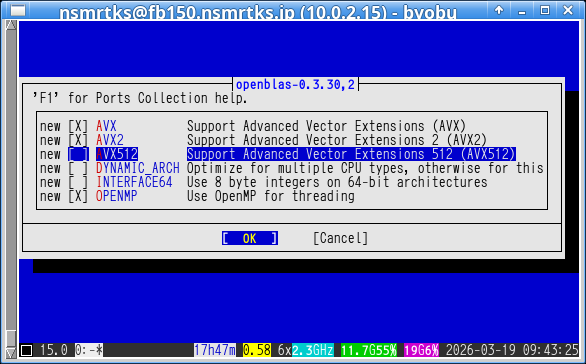
途中、openblas のオプションで、『AVX』『AVX2』の選択が出てきたので、チェックを付けてみた。 『AVX512』はチェックを付けないまま置いておく。 (いずれも筆者の環境の場合)
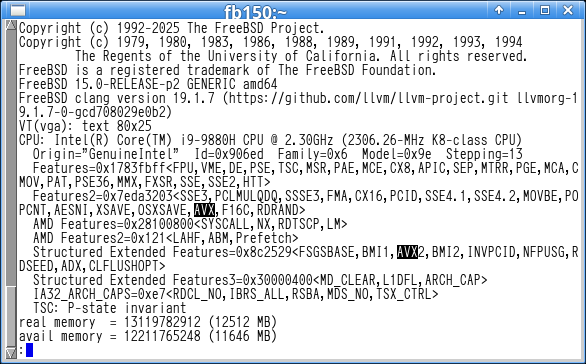
AVX や AVX2 に対応しているかどうかは、dmesg コマンドなどで分かる。
% dmesg | less -c
↓ (さらに「/AVX」と入力しエンターを押すと「AVX」が検索できる)
〜
** Listing the failed packages (-:ignored / *:skipped / !:failed)
        ! graphics/ImageMagick7 (install error)
teetime! 2026年 3月19日 木曜日 13時03分22秒 JST

(パスワードを入力しそこねたのでいまいちど)

% nice +20 teetime -t ImageMagick7_ portinstall -sw ImageMagick7
conflicting ImageMagick7_20260319.log
logging (from the next line till the end) to ImageMagick7_2026031913.log
teetime! 2026年 3月19日 木曜日 13時13分45秒 JST
teetime! working directory is /var/tmp/log/Install
teetime> portinstall -sw ImageMagick7
[Reading data from pkg(8) ... - 495 packages found - done]
〜
teetime! 2026年 3月19日 木曜日 13時27分08秒 JST
無事にコンパイル・インストール出来た。
magit というのは、Emacs から git を使うための Emacs Lisp である。
筆者が仕事で使わせてもらっている。
% pkg search magit
magit-4.4.2_1                  Interface to Git for Emacs
magit-emacs_canna-4.4.2_1      Interface to Git for Emacs
magit-emacs_devel-4.4.2_1      Interface to Git for Emacs
magit-emacs_devel_nox-4.4.2_1  Interface to Git for Emacs
magit-emacs_nox-4.4.2_1        Interface to Git for Emacs
magit-emacs_wayland-4.4.2_1    Interface to Git for Emacs

% cd /var/tmp/log/Install/

% nice +20 teetime -t magit portinstall -s magit
logging (from the next line till the end) to magit20260319.log
teetime! 2026年 3月19日 木曜日 13時47分33秒 JST
teetime! working directory is /var/tmp/log/Install
teetime> portinstall -s magit
[Reading data from pkg(8) ... - 496 packages found - done]
〜
** Listing the failed packages (-:ignored / *:skipped / !:failed)
        ! devel/magit   (dependent ports)
teetime! 2026年 3月19日 木曜日 13時59分15秒 JST

(パスワードを入力しそこねたのでいまいちど)

% nice +20 teetime -t magit portinstall -s magit
conflicting magit20260319.log
logging (from the next line till the end) to magit2026031914.log
teetime! 2026年 3月19日 木曜日 14時00分03秒 JST
teetime! working directory is /var/tmp/log/Install
teetime> portinstall -s magit
[Reading data from pkg(8) ... - 496 packages found - done]
〜
teetime! 2026年 3月19日 木曜日 14時09分26秒 JST
% cd /var/tmp/log/Install/

% nice +20 teetime -t xload portinstall -s xload
logging (from the next line till the end) to xload20260323.log
teetime! 2026年 3月23日 月曜日 10時05分16秒 JST
teetime! working directory is /var/tmp/log/Install
teetime> portinstall -s xload
[Reading data from pkg(8) ... - 502 packages found - done]
〜
teetime! 2026年 3月23日 月曜日 10時09分02秒 JST

% nice +20 teetime -t oclock portinstall -s oclock
logging (from the next line till the end) to oclock20260323.log
teetime! 2026年 3月23日 月曜日 10時11分39秒 JST
teetime! working directory is /var/tmp/log/Install
teetime> portinstall -s oclock
[Reading data from pkg(8) ... - 503 packages found - done]
〜
teetime! 2026年 3月23日 月曜日 10時15分06秒 JST

% nice +20 teetime -t xlogo portinstall -s xlogo
logging (from the next line till the end) to xlogo20260323.log
teetime! 2026年 3月23日 月曜日 10時15分47秒 JST
teetime! working directory is /var/tmp/log/Install
teetime> portinstall -s xlogo
[Reading data from pkg(8) ... - 504 packages found - done]
〜
teetime! 2026年 3月23日 月曜日 10時19分20秒 JST

% nice +20 teetime -t xmag portinstall -s xmag
logging (from the next line till the end) to xmag20260323.log
teetime! 2026年 3月23日 月曜日 10時46分52秒 JST
teetime! working directory is /var/tmp/log/Install
teetime> portinstall -s xmag
[Reading data from pkg(8) ... - 511 packages found - done]
〜
teetime! 2026年 3月23日 月曜日 10時50分10秒 JST
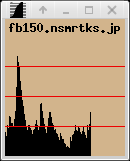
実行例。 oclock については、-transparent を付けて、さらに xload のウィンドウの上に置いてみた例。
% xload -bg tan -hl red2 &

% oclock -transparent &

% xlogo -render &

% xmag &
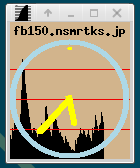

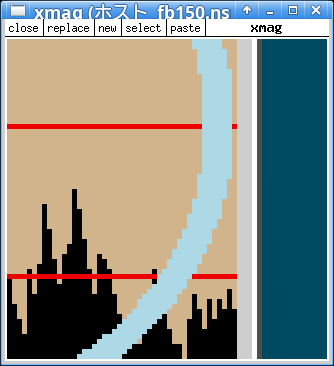
ここで筆者の ~/.Xdefaults には、以下の記述があり、oclock や xlogo には自動的に色が付く。
*customization: -color
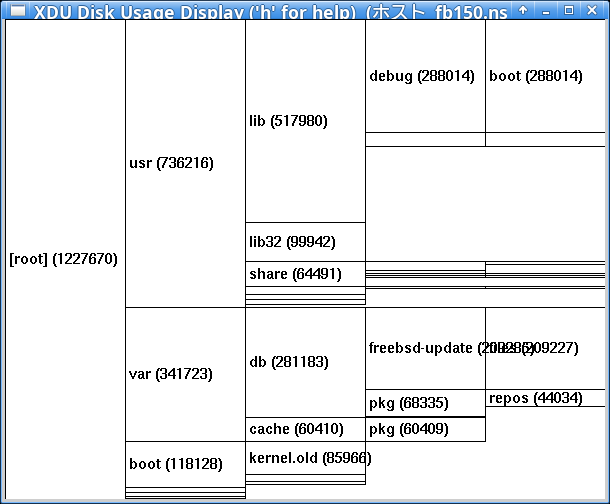
xdu とは、du の出力を入力すると、それをグラフィカルに表示してくれるツールである。
応用次第で、du の出力に類似のテキストをグラフィカルに表示するといった用途も考えられる (筆者はそれを思い付いて実際にやったことがある)。
このタイミングで (sudo) portsclean -C も実行している。
% ls -ld /usr/ports/*/*/work*
drwxr-xr-x  5 root    wheel 20  3月 19 09:13 /usr/ports/archivers/libzip/work/
〜

% df -h /usr/ports/
Filesystem         Size    Used   Avail Capacity  Mounted on
zroot/usr/ports     22G    8.3G     14G    37%    /usr/ports

% sudo portsclean -C
パスワード: 〜
Cleaning out /usr/ports/*/*/work...
〜
done.

% df -h
Filesystem            Size    Used   Avail Capacity  Mounted on
zroot/ROOT/default     20G    1.2G     19G     6%    /
devfs                 1.0K      0B    1.0K     0%    /dev
tmpfs                 7.0G     36K    7.0G     0%    /tmp
zroot/usr/ports        22G    3.5G     19G    16%    /usr/ports
zroot                  19G     96K     19G     0%    /zroot
zroot/home             19G    128K     19G     0%    /home
zroot/usr/src          20G    980M     19G     5%    /usr/src
zroot/usr/local        22G    3.7G     19G    17%    /usr/local
zroot/var/audit        19G     96K     19G     0%    /var/audit
zroot/var/crash        19G     96K     19G     0%    /var/crash
zroot/home/nsmrtks     23G    4.3G     19G    19%    /home/nsmrtks
zroot/var/log          19G    344K     19G     0%    /var/log
zroot/var/mail         19G    128K     19G     0%    /var/mail
zroot/var/tmp          19G     19M     19G     0%    /var/tmp
/dev/da0p1             19G     13G    4.6G    74%    /home/distfiles

% cd /var/tmp/log/Install/

% nice +20 teetime -t xdu portinstall -s xdu
logging (from the next line till the end) to xdu20260323.log
teetime! 2026年 3月23日 月曜日 10時41分47秒 JST
teetime! working directory is /var/tmp/log/Install
teetime> portinstall -s xdu
[Reading data from pkg(8) ... - 505 packages found - done]
〜
teetime! 2026年 3月23日 月曜日 10時45分35秒 JST
ルートパーティションの使用量を表示させる実行例。 (du に -x オプションを付けることにより、別パーティションが対象外になっている。)
% sudo du -kx / | xdu
〜
n を押すと大きさ順にソートされたり、h を押すとヘルプが表示されたりする。 n を押した所。
映像/音楽プレイヤーである。
ここで、コンパイル前に、残っていた work* ディレクトリも削除しておいた。 (sudo portsclean -C も試したが消えなかった)
% ls -ld /usr/ports/*/*/work*
drwxr-xr-x  4 root wheel 21  3月 19 10:46 /usr/ports/devel/boost-python-libs/work-py311/
drwxr-xr-x  4 root wheel 21  3月 19 09:33 /usr/ports/devel/meson-python/work-py311/
drwxr-xr-x  4 root wheel 21  3月 19 09:33 /usr/ports/devel/py-pyproject-metadata/work-py311/
drwxr-xr-x  5 root wheel 24  3月 19 10:11 /usr/ports/math/py-numpy/work-py311/
drwxr-xr-x  5 root wheel 22  3月 19 11:31 /usr/ports/multimedia/ffmpeg/work-default/

% sudo rm -fr /usr/ports/*/*/work*

% ls -ld /usr/ports/*/*/work*
(何も出ない)

% df -h /usr/ports
Filesystem         Size    Used   Avail Capacity  Mounted on
zroot/usr/ports     22G    2.6G     20G    12%    /usr/ports

% cd /var/tmp/log/Install/

% nice +20 teetime -t mplayer portinstall -s mplayer
conflicting mplayer20260325.log
logging (from the next line till the end) to mplayer2026032508.log
teetime! 2026年 3月25日 水曜日 08時56分55秒 JST
teetime! working directory is /var/tmp/log/Install
teetime> portinstall -s mplayer
[Reading data from pkg(8) ... - 512 packages found - done]
〜
teetime! 2026年 3月25日 水曜日 09時10分23秒 JST
無事にコンパイル・インストールできた。
音声も正常に鳴るようだ。
筆者は、ウィンドウマネージャというか統合デスクトップとして、ここ数年は Xfce を使っている。
昔は mwm (Motif Window Manager) を長らく使っていたり、また WindowMaker も少し使っていたのだが、どうも古くて動作に支障が出ていると思うようになった。 twm も昔は使っていた。
Xfce のことは以下などで知った。
- FreeBSD ハンドブック → パート I. 導入 → 第5章 X Window System → 5.7. デスクトップ環境
% pkg search xfce
〜
xfce-4.20                      Meta-port for the Xfce Desktop Environment
〜

% cd /var/tmp/log/Install/

% nice +20 teetime -t xfce portinstall -s xfce
logging (from the next line till the end) to xfce20260325.log
teetime! 2026年 3月25日 水曜日 12時53分44秒 JST
teetime! working directory is /var/tmp/log/Install
teetime> portinstall -s xfce
[Reading data from pkg(8) ... - 515 packages found - done]
〜
** Listing the failed packages (-:ignored / *:skipped / !:failed)
        ! x11-wm/xfce4  (fetch error)
teetime! 2026年 3月25日 水曜日 13時57分42秒 JST

% nice +20 teetime -t xfce portinstall -sw xfce
conflicting xfce20260325.log
logging (from the next line till the end) to xfce2026032514.log
teetime! 2026年 3月25日 水曜日 14時02分57秒 JST
teetime! working directory is /var/tmp/log/Install
teetime> portinstall -sw xfce
[Reading data from pkg(8) ... - 583 packages found - done]
〜
teetime! 2026年 3月25日 水曜日 15時29分10秒 JST
(筆者の環境の要因で途中で失敗してしまったので portinstall -sw でやり直している)
無事にコンパイル・インストールできたようだ。
Xfce は startxfce4 コマンドで起動できる。
ここで、筆者の ~/.xinitrc は、startxfce4
コマンドが存在していれば自動的に実行するようになっている。
(さもなくば twm が起動するようになっていたりする)
とりあえず先ほどまで startx で起動させていた X11 を終了し (twm が起動)、あらためて startx し直すと、Xfce が起動した。
また、旧環境から引き継いだ設定により、自動的に 1920x1080 になるのと、Xfce の上下のバーは自動的に隠すようになっており見えていない。

またこれにより、筆者のデスクトップ環境を、旧環境 (fb140) から、新環境 (fb150) へ移行することが可能となったので、以前からもたびたびやっていたが、このタイミングで、VirtualBox の fb140 と fb150 の「CPU 数」や「メインメモリー」の設定を、fb140 は減らし、その分 fb150 を増やして、「本番仕様」とした。 (fb140 と fb150 の両方とも大きいままだと筆者の PC のリソースを食い合ってしまうため)
日本語入力のためのものである。
Emacs で mozc を使うためのものである。
% pkg search mozc-el
ja-mozc-el-2.23.2815.102.01_31 Emacs input method for Mozc
ja-mozc-el-emacs_canna-2.23.2815.102.01_31 Emacs input method for Mozc
ja-mozc-el-emacs_devel-2.23.2815.102.01_31 Emacs input method for Mozc
ja-mozc-el-emacs_devel_nox-2.23.2815.102.01_31 Emacs input method for Mozc
ja-mozc-el-emacs_nox-2.23.2815.102.01_31 Emacs input method for Mozc
ja-mozc-el-emacs_wayland-2.23.2815.102.01_31 Emacs input method for Mozc

% cd /var/tmp/log/Install/

% nice +20 teetime -t ja-mozc-el_ portinstall -s ja-mozc-el
logging (from the next line till the end) to ja-mozc-el_20260326.log
teetime! 2026年 3月26日 木曜日 10時22分25秒 JST
teetime! working directory is /var/tmp/log/Install
teetime> portinstall -s ja-mozc-el
[Reading data from pkg(8) ... - 710 packages found - done]
〜
Installing ja-mozc-el-2.23.2815.102.01_31...
To activate mozc, you will need to add the following lines to
your ~/.emacs:

(set-language-environment "Japanese")
(setq default-input-method "japanese-mozc")
(global-set-key (kbd "C-o") 'toggle-input-method)
〜
teetime! 2026年 3月26日 木曜日 10時44分39秒 JST
mozc-server (ja-mozc-server) もインストールされる。
% pkg info | egrep mozc
ja-mozc-el-2.23.2815.102.01_31 Emacs input method for Mozc
ja-mozc-server-2.23.2815.102.01_31 Mozc Japanese Input Method, Server
起動については後述する。
Emacs への設定方法について、ビルドのログにもメッセージが出ている。 (再掲)
To activate mozc, you will need to add the following lines to
your ~/.emacs:

(set-language-environment "Japanese")
(setq default-input-method "japanese-mozc")
(global-set-key (kbd "C-o") 'toggle-input-method)
この 3行を ~/.emacs に書くわけだが..
(if (load "mozc" t) (setq default-input-method "japanese-mozc"))
Emacs 以外のソフトでも日本語入力するためのものである。
他には ja-uim-mozc や ja-ibus-mozc という選択肢もある。
% pkg search mozc | egrep -v emacs
ja-boiled-mozc-0.7_25          Wrapper to mozc.el that offers modeless ("boil"ed) input style
ja-fcitx-mozc-2.23.2815.102.01_31 Mozc engine for Fcitx
ja-ibus-mozc-2.23.2815.102.01_31 Mozc engine for IBus
ja-mozc-el-2.23.2815.102.01_31 Emacs input method for Mozc
ja-mozc-server-2.23.2815.102.01_31 Mozc Japanese Input Method, Server
ja-mozc-tool-2.23.2815.102.01_31 Mozc tool for IBus, SCIM, and others
ja-uim-mozc-2.23.2815.102.01_11 Mozc engine for uim

% cd /var/tmp/log/Install/

〜

% nice +20 teetime -t ja-fcitx-mozc_ portinstall -s ja-fcitx-mozc
conflicting ja-fcitx-mozc_20260327.log
conflicting ja-fcitx-mozc_2026032711.log
logging (from the next line till the end) to ja-fcitx-mozc_202603271148.log
teetime! 2026年 3月27日 金曜日 11時48分02秒 JST
teetime! working directory is /var/tmp/log/Install
teetime> portinstall -s ja-fcitx-mozc
[Reading data from pkg(8) ... - 773 packages found - done]
〜
** Listing the failed packages (-:ignored / *:skipped / !:failed)
	! japanese/fcitx-mozc	(dependent ports)
teetime! 2026年 3月27日 金曜日 11時55分17秒 JST

〜

% nice +20 teetime -t ja-fcitx-mozc_ portinstall -sw ja-fcitx-mozc
conflicting ja-fcitx-mozc_20260327.log
conflicting ja-fcitx-mozc_2026032714.log
logging (from the next line till the end) to ja-fcitx-mozc_202603271440.log
teetime! 2026年 3月27日 金曜日 14時40分52秒 JST
teetime! working directory is /var/tmp/log/Install
teetime> portinstall -sw ja-fcitx-mozc
[Reading data from pkg(8) ... - 773 packages found - done]
〜
Installing ja-fcitx-mozc-2.23.2815.102.01_31...
To activate fcitx-mozc, please add the following into ~/.xinitrc,
~/.xsession, or ~/.kde4/env (for KDE4):

export GTK_IM_MODULE=fcitx
export QT_IM_MODULE=xim
export XMODIFIERS=@im=fcitx
/usr/local/bin/mozc start
fcitx -r -d
〜
teetime! 2026年 3月27日 金曜日 17時27分54秒 JST
(筆者の環境の都合で何度かやり直しているが) なんとか無事にコンパイル・インストール出来た。
先ほどのビルドのログにも出ているようなものを、~/.xinitrc
に書いておくと、startx で mozc と fcitx が同時に起動される。
筆者は ~/.xinitrc を tcsh 用に書いているので、以下のようにしている。
setenv GTK_IM_MODULE fcitx
setenv QT_IM_MODULE xim
setenv XMODIFIERS @im=fcitx
/usr/local/bin/mozc start
fcitx -r -d
一旦、X11 サーバを終了させて、startx し直した。
しかし、しばらくすると、キーボードが US 配列になってしまうという症状に見舞われた。
また、Shift-SPC で fcitx を ON/OFF したいのだが、どうも
Ctrl-SPC になってしまうようだ。
Ctrl-SPC だと Emacs の操作とバッティングする。
(そもそも Emacs では mozc-el を使うので fcitx が ON になってくれなくていいのだが)
そこで、ここでは以下のようにした。
まず、X11 サーバを終了させる。
(いちど X11 サーバを終了させずに、Xfce
のバーのキーボードのアイコンを右クリック→『再起動』したら、後述の
~/.config/fcitx/profile の内容が上書きされてしまった。)
そうしたら、~/.config/fcitx/config をエディタ (emacs) で開き、TriggerKey= を以下のように書き換える。 (念のため元の config ファイルは config.BACK というファイルにバックアップしておいた)
この設定は、筆者の別の環境 (KDE) で、何故か既に Shift-SPC で fcitx の ON/OFF が出来ている環境を参考にした。
# 入力メソッドのオンオフ
TriggerKey=CTRL_SPACE ZENKAKUHANKAKU
↓
# 入力メソッドのオンオフ
TriggerKey=SHIFT_SPACE ZENKAKUHANKAKU
次に、今度は ~/.config/fcitx/profile をエディタ (emacs) で開き、EnabledIMList= で、以下のようにする。 (念のため元の profile ファイルは profile.BACK というファイルにバックアップしておいた)
# 現在使える入力メソッドのリスト
EnabledIMList=fcitx-keyboard-us:True,〜
↓
# 現在使える入力メソッドのリスト
EnabledIMList=fcitx-keyboard-jp:True,fcitx-keyboard-us:False,〜
~/.config/fcitx/profile の方の設定は基本的に Google Gemini に教えてもらったのと (生成 AI おそるべし)、やはり筆者の別の環境 (KDE) で何故かキーボード配列がうまくいっているものを参考にした。
そうして startx し直すと、キーボードが JP 配列になり (US 配列にならなくなり)、また fcitx の ON/OFF の操作が Ctrl-SPC から Shift-SPC に変わった。
この時点で、Emacs では mozc で漢字変換できるようになっており、urxvt (rxvt-unicode) でも、Shift-SPC か「半角/全角」を押して、入力・漢字変換できることを確認した。
筆者が開発で使わせてもらっている。
% pkg search pycharm
pycharm-2025.3.1_1             JetBrains PyCharm IDE

% cd /var/tmp/log/Install/

% nice +20 teetime -t pycharm portinstall -s pycharm
logging (from the next line till the end) to pycharm20260326.log
teetime! 2026年 3月26日 木曜日 13時59分41秒 JST
teetime! working directory is /var/tmp/log/Install
teetime> portinstall -s pycharm
[Reading data from pkg(8) ... - 733 packages found - done]
〜
teetime! 2026年 3月26日 木曜日 14時57分30秒 JST
無事にインストール出来た。
Shift-SPC や「半角/全角」を押して、入力・漢字変換できることも確認した。
他に Chromium という選択肢もある。 (ただしコンパイルにかなり時間がかかったりディスクを消費したりする)
% cd /var/tmp/log/Install/

% nice +20 teetime -t firefox portinstall -s firefox
logging (from the next line till the end) to firefox20260326.log
teetime! 2026年 3月26日 木曜日 15時21分41秒 JST
teetime! working directory is /var/tmp/log/Install
teetime> portinstall -s firefox
[Reading data from pkg(8) ... - 744 packages found - done]
〜
teetime! 2026年 3月27日 金曜日 10時16分54秒 JST
無事にコンパイル・インストール出来た。
(筆者の作業時間の都合で、途中で仮想マシンを保存→起動しているので、コンパイルにひと晩かかったようにも見えるかもしれないが、実際のコンパイル時間はそこまでかかっていない。)
Shift-SPC や「半角/全角」を押して、入力・漢字変換できることも確認した。
当初 ja-fcitx-mozc の代わりに ja-uim-mozc を試していたのだが、Shift-SPC や「半角/全角」を押すと、日本語入力が始まることは始まるのだが、入力が渡らず、場合によっては Firefox がハングしてしまうという症状に見舞われた。 うーむ..
% cd /var/tmp/log/Install/

% nice +20 teetime -t libreoffice portinstall -s libreoffice
logging (from the next line till the end) to libreoffice20260331.log
teetime! 2026年 3月31日 火曜日 09時03分50秒 JST
teetime! working directory is /var/tmp/log/Install
teetime> portinstall -s libreoffice
[Reading data from pkg(8) ... - 785 packages found - done]
〜
teetime! 2026年 3月31日 火曜日 16時57分33秒 JST
無事にコンパイル・インストール出来た。
ただ、Shift-SPC や「半角/全角」を押しても、日本語入力できないようだ..